Connect SendGrid with Autocalls.ai AI voice agents
Connect SendGrid with AI voice agents to trigger faster follow-ups and smarter email outreach. Turn every call outcome into an automated email action in seconds.
Use SendGrid phone integration to automatically send text, HTML, or dynamic template emails after every AI call. This helps your team confirm next steps, push appointment booking, and support faster AI call center automation without manual work.
With call automation and SendGrid in one flow, leads receive the right message while intent is still high. That means fewer missed follow-ups and more conversations moving toward conversion.
Combine AI outbound calling with SendGrid to send the right message based on what happened during the conversation. Your auto dialer can qualify leads by phone, then trigger a custom email or dynamic template to share offers, reminders, or next steps.
This setup is ideal for sales, support, and AI cold calling teams that need consistent outreach at scale. It also strengthens WhatsApp AI chatbot campaigns by keeping email follow-up aligned across channels.
Send custom API calls to SendGrid from your voice workflows when you need more control than a basic email send. This gives teams the flexibility to launch template-based campaigns, trigger transactional emails, and adapt messaging based on each phone interaction.
For service teams, this improves response speed after inbound calls handled by an AI answering service or AI virtual receptionist. You get cleaner handoffs, better communication, and stronger customer trust.
Get a hands-on experience by trying a free demo call. Fill in your details, and our AI representative will call you instantly.
Try now a free AI call✓ No credit card required ✓ No commitment
Powerful actions you can trigger with SendGrid to automate your workflows
Send a text or HTML email
Emails of the recipients
Sender email, must be on your SendGrid
HTML is only allowed if you selected HTML as type
Email to receive replies on (defaults to sender)
Sender name
Send a custom API call to a specific endpoint
Authorization headers are injected automatically from your connection.
Send an email using a dynamic template
Emails of the recipients
Sender email, must be on your SendGrid
Email to receive replies on (defaults to sender)
Sender name
Dynamic template id
Dynamic template data
Real-world examples of how businesses use SendGrid integration to automate workflows
When an AI voice agent cannot reach a lead, SendGrid instantly sends a follow-up email. This keeps prospects engaged without waiting on a rep.
After a successful qualification call, SendGrid sends a dynamic template matched to the lead outcome. Sales teams stay relevant while interest is still high.
Once a caller books a time with the AI agent, SendGrid delivers a confirmation email immediately. Customers get clear details and fewer appointments are missed.
After a support conversation, SendGrid sends a text or HTML recap of what was discussed. Customers leave the call with helpful next steps in writing.
Voice workflows can send a custom API call to SendGrid for advanced routing or campaign logic. This gives teams tighter control over message timing and content.
An AI dialer can call a lead first, then SendGrid follows up with a relevant offer email. The combination improves response rates across phone and inbox.
Easily manage AI voice agents without the need for programming skills.
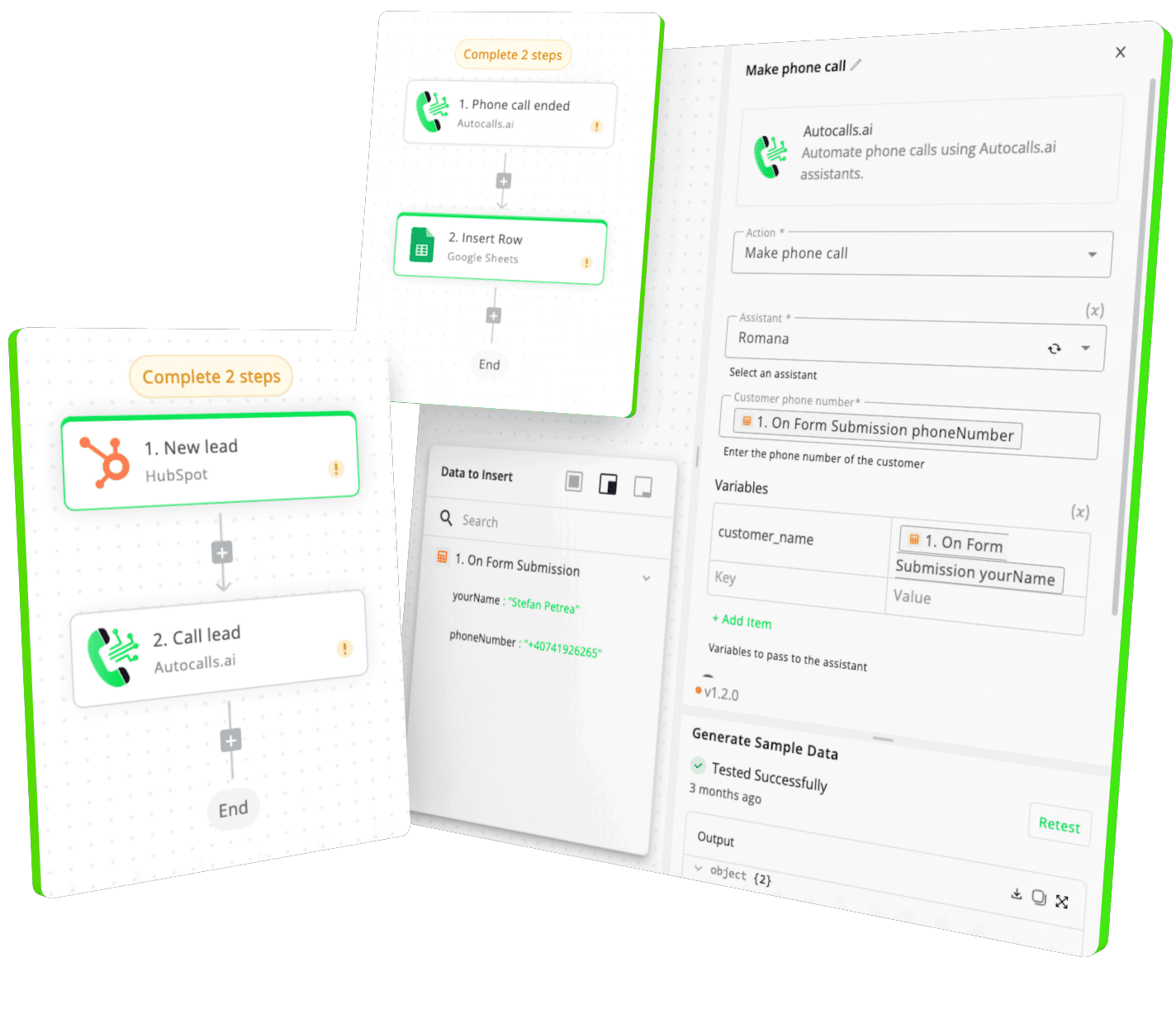
Integrate with popular tools such as HubSpot, GoHighLevel, Zoho, Cal.com & +250 more and build automations using drag and drop.
+250 tools ready to integrate with your AI agents flow in our no-code platform, similar to Zapier or Make.
Have a question that is not answered? You can contact us at
Have a question? Contact usSendGrid phone integration connects your AI calling workflows with SendGrid email actions. After a call, your agent can automatically send an email, launch a dynamic template, or make a custom API call so follow-up happens right away.
A SendGrid auto dialer workflow lets your AI calling system handle the conversation first, then trigger the right email based on the result. This helps teams respond faster, reduce manual tasks, and keep every lead moving with consistent outreach.
Yes, SendGrid AI dialer automation works well for both sales and support use cases. Sales teams can send offers or next-step emails after outbound calls, while support teams can send summaries, confirmations, or transactional updates.
SendGrid phone automation uses the result of an AI call to decide what email should be sent next. For example, a booked appointment can trigger a confirmation email, while an unanswered call can trigger a follow-up message.
Yes, SendGrid call automation is a strong fit for booking and reminder workflows. Your AI voice agent can handle the conversation, then SendGrid can send confirmations, reschedule options, or reminder emails automatically.
A SendGrid voice agent integration can send text emails, HTML emails, and dynamic template emails. It can also use custom API calls for more advanced messaging logic when your workflow needs extra flexibility.
No, most teams can build SendGrid phone integration using no-code workflow steps inside the platform. You can connect AI calls to SendGrid actions quickly and use automation without building a complex custom system.
Join thousands of businesses already automating their phone calls with our
SendGrid integration.
You can get your assistant ready in few minutes.
The full path forward. Strategy, scripts, pricing, and the operating cadence agencies use to scale a white-label voice AI business. Free PDF, delivered to your inbox.